One line
to the wallet.
On wharfkit, add nussio-wharfkit-plugin and the wallet shows up in the login dialog. Without it, every page still gets window.nussio: log in, transact, sign, done. And because the wallet answers the same protocols as Anchor, an app already built for Anchor works unchanged.
- wharfkit wallet plugin
- window.nussio provider
- EOSIO Signing Requests
- anchor-link sessions
- Chrome, Edge, Brave and Firefox
On wharfkit? One install
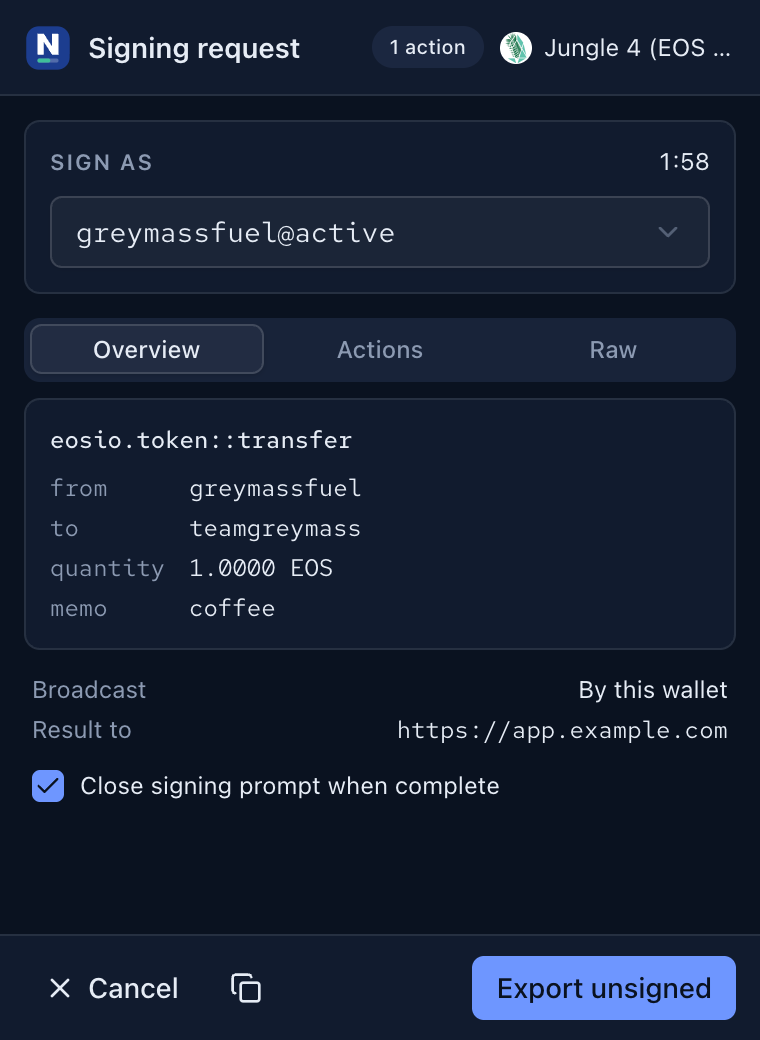
nussio-wharfkit-plugin is a WalletPlugin for @wharfkit/session. It talks to the extension directly through window.nussio: no relay, no QR code, no callback URL. Login opens the prompt; every transaction opens the prompt.
// npm i nussio-wharfkit-plugin @wharfkit/session @wharfkit/web-renderer
import { SessionKit } from '@wharfkit/session'
import { WebRenderer } from '@wharfkit/web-renderer'
import { WalletPluginNussio } from 'nussio-wharfkit-plugin'

const kit = new SessionKit({
  appName: 'my-app',
  chains: [{ id: '73e4385a2708e6d7048834fbc1079f2fabb17b3c125b146af438971e90716c4d',
             url: 'https://jungle4.greymass.com' }],
  ui: new WebRenderer(),
  walletPlugins: [new WalletPluginNussio()],
})

const { session } = await kit.login()

await session.transact({
  action: {
    account: 'eosio.token',
    name: 'transfer',
    authorization: [session.permissionLevel],
    data: { from: session.actor, to: 'teamgreymass', quantity: '1.0000 EOS', memo: '' },
  },
})
What the plugin does
Greymass Fuel only runs for requests the extension broadcasts itself. With this plugin wharfkit broadcasts, so add @wharfkit/transact-plugin-resource-provider when you want cosigned resources. Errors from the extension arrive as NussioWalletError with the same string codes listed below; source and tests are on GitHub.
One object, five methods
Every page gets a frozen window.nussio in the page world. Nothing to install, nothing to bundle: feature-detect it, call login(), and transact.
if (window.nussio?.isNussioWallet) {
  const { actor, permission } = await window.nussio.login()

  await window.nussio.transact({
    action: {
      account: 'eosio.token',
      name: 'transfer',
      data: { from: actor, to: 'teamgreymass', quantity: '1.0000 EOS', memo: '' },
    },
  })
}
Five methods, nothing else. There is no call that reads a key, and no call that skips the prompt. Every option is listed below.
Every method, every option
Arguments the provider does not recognise are ignored. Anything malformed rejects with invalid_params before a prompt ever opens.
On the object itself
The object is frozen and defined non-writable and non-configurable, so a later script on the page cannot replace it.
login(chainId?: string): Promise<LoginResult>
Opens an identity request in the prompt. On approval the origin is remembered as a connection, which is what every other method requires.
Options
- chainId
- Optional 64-character chain id. Left out, the wallet uses the chain the user has selected, or the first enabled chain if that one is off. A chain the user has not enabled rejects with unknown_chain, and a value that is not a string rejects with invalid_params.
Resolves with
- chainId
- The chain the user logged in on.
- actor
- Account name, e.g. teamgreymass.
- permission
- The permission chosen in the prompt, e.g. active.
// current chain
const { chainId, actor, permission } = await window.nussio.login()

// or pin the chain your app runs on
const JUNGLE4 =
  '73e4385a2708e6d7048834fbc1079f2fabb17b3c125b146af438971e90716c4d'

await window.nussio.login(JUNGLE4)
transact(args: TransactArgs | string): Promise<TransactResult>
Builds a signing request from what you pass, opens the prompt, and — unless you turn broadcast off — pushes the signed transaction. Requires a connection. TAPOS, expiry and ABI lookups are the wallet's job; send actions, not a packed transaction.
Options
- action
- A single action object: { account, name, authorization?, data }. Ignored when actions is present.
- actions
- An array of those, signed in the order given. Wins over every other source.
- transaction
- An object with an actions array. Only that array is read; header fields you set are replaced by the wallet's own.
- broadcast
- Defaults to true. Set false to get the signatures back without pushing; blockNum is then absent and transactionId is the id of the unbroadcast transaction.
- chainId
- Optional. Defaults to the chain of the connection, not the wallet's current selection, so switching chains in the UI cannot move a request under your app.
Authorization
An action with no authorization, or an empty one, is signed as the connected account. An action that names its own authorization is passed through untouched and the prompt shows exactly what was asked for — including an account the wallet cannot sign for, which then fails as authorization.
Resolves with
- chainId
- The chain the transaction was signed for.
- transactionId
- Transaction id. Present for both broadcast and signed-only results.
- blockNum
- Block number, when the node reported one.
- signatures
- Every signature on the transaction, cosigner first when Greymass Fuel covered the resources.
// one action, signed as the connected account
await window.nussio.transact({
  action: {
    account: 'eosio.token',
    name: 'transfer',
    data: { from: actor, to: 'teamgreymass',
            quantity: '1.0000 EOS', memo: 'coffee' },
  },
})

// several actions, and sign without broadcasting
const { signatures } = await window.nussio.transact({
  broadcast: false,
  actions: [
    { account: 'eosio', name: 'buyrambytes',
      data: { payer: actor, receiver: actor, bytes: 4096 } },
    { account: 'eosio', name: 'delegatebw',
      authorization: [{ actor, permission: 'active' }],
      data: { from: actor, receiver: actor, stake_net_quantity: '0.1000 EOS',
              stake_cpu_quantity: '0.1000 EOS', transfer: false } },
  ],
})

// an object shaped like a transaction: only its actions are used
await window.nussio.transact({ transaction: { actions: [myAction] } })
sign(request: string): Promise<TransactResult>
Hands an existing signing request to the wallet — one your backend built, or one you received from somewhere else. Requires a connection, and resolves exactly like transact().
Options
- request
- required A request URI with an esr:, esr-anchor:, anchor: or eosio: scheme, up to 16 KB. Anything else rejects with invalid_params. The chain comes from the request, so it can differ from the one you logged in on.
const { transactionId } = await window.nussio.sign(
  'esr://gmNgZGBY1mTC_MoglIGBIVzX5uxpRqAQGMBoexAJAA',
)
isConnected(): Promise<boolean>
True when this exact origin has an approved login. Takes no arguments. Cheap enough to call on page load; it never opens a prompt.
if (window.nussio?.isNussioWallet && !(await window.nussio.isConnected())) {
  showConnectButton()
}
disconnect(): Promise<boolean>
Drops this origin's connection and resolves true. Takes no arguments, opens no prompt, and is safe to call when there is nothing to drop. The next transact() rejects with not_connected until the user logs in again.
await window.nussio.disconnect()Already built for Anchor?
Then there is nothing to add. The extension answers the same protocols as the desktop app — signing requests and anchor-link sessions — so wharfkit with the Anchor wallet plugin picks it up unchanged, and that one integration reaches every other Anchor-compatible wallet too. Ship both plugins if you like; the user chooses in the login dialog.
// npm i @wharfkit/session @wharfkit/web-renderer @wharfkit/wallet-plugin-anchor
import { SessionKit } from '@wharfkit/session'
import { WebRenderer } from '@wharfkit/web-renderer'
import { WalletPluginAnchor } from '@wharfkit/wallet-plugin-anchor'

const kit = new SessionKit({
  appName: 'my-app',
  chains: [{ id: '73e4385a2708e6d7048834fbc1079f2fabb17b3c125b146af438971e90716c4d',
             url: 'https://jungle4.greymass.com' }],
  ui: new WebRenderer(),
  walletPlugins: [new WalletPluginAnchor()],
})

const { session } = await kit.login()

await session.transact({
  action: {
    account: 'eosio.token',
    name: 'transfer',
    authorization: [session.permissionLevel],
    data: { from: session.actor, to: 'teamgreymass', quantity: '1.0000 EOS', memo: '' },
  },
})
wharfkit first tries window.location.href = 'esr:…', which no extension can intercept — browsers do not route unknown schemes to one. It logs a failure and falls back to its Launch Anchor button, and that button is captured. Nothing to change on your side; the failed attempt in the console is expected.
Four ways in
However the request is delivered, it ends at the same prompt with the actions decoded against the on-chain ABI.
esr: · esr-anchor: · anchor: · eosio:
A content script captures the click before the page sees it, including links inside closed shadow roots, and opens the prompt window.
window.open('esr:…')
Patched in the page world, so a popup-based launcher is captured too.
A pasted request
Users can paste a request URI into the popup, or into Broadcast → Signing request in the full wallet.
A session request
After a login that carries a link info key, requests travel sealed over the buoy relay. They reach the wallet with every extension page closed, and the prompt window opens on its own.
What comes back from a login
An identity request carrying the link info key gets link_ch, link_key, link_name and link_meta in the callback — everything anchor-link needs to open a session. link_meta reports sameDevice: false, so wharfkit offers the link and QR path the extension can capture rather than a same-device redirect it cannot.
What the wallet will not do
The rules below are enforced in the extension, not in your page, so an app cannot opt out of them. Design for the refusal rather than around it.
Always
- Every call opens the prompt. There is no silent signing.
- The origin is read from the message sender, never from anything the page passes.
- login is the only method that works unconnected; everything else rejects with not_connected.
- A user can drop a connection under Settings → Connected websites, or turn the provider off entirely.
Refused
- updateauth, linkauth and deleteauth on owner or active, unless the user has enabled dangerous transactions.
- Requests over 16 KB, or that decompress past 500 KB.
- More than five capture attempts from one origin in ten seconds.
- A prompt left open for five minutes, which rejects as a decline.
Rejections are strings
- not_connected
- rejected
- connections_disabled
- invalid_params
- unknown_method
- unknown_chain
- no_chains
- rate_limited
- params_too_large
- too_many_requests
- unknown_origin
A request that reaches the chain and fails there rejects with the wallet's own error kind instead: authorization, cpu, net, ram, expired, duplicate, assert, forbidden, network, fuel_invalid, ledger, invalid or unknown. Match on the string; do not parse the message.
Cancelling a request posts {"rejected": …} to the callback URL. Treat that as a user decline, not a timeout. Background POST callbacks and foreground redirects both work, with the standard template variables including cid, sig0…N, bn and tx.
Try it on Jungle 4
A testnet account and a local build are enough to walk the whole path, login through session transact.
- Install the wallet. Take the Chrome build from the install page, or run pnpm build and load dist/chrome-mv3 unpacked.
- Import a Jungle 4 account. Set a password, enable Jungle 4, and import its active key.
- Log in from your app. Point it at Jungle 4 with the Nussio plugin, or the Anchor plugin. The prompt opens on the identity request.
- Call transact(). With the Nussio plugin the prompt opens straight away. With the Anchor plugin, close every extension page first — the request still arrives, over the session channel opened at login.
Something behaving differently from Anchor is a bug worth reporting. Open an issue with the request URI and what the prompt showed.